Change the LAN address and get back in: old/new subnet, DHCP and recovery
Outcome
Section titled “Outcome”- Pick a new LAN subnet that does not overlap WAN/upstream/VPN;
- Understand why the old address dies immediately and how to reach the new one;
- Move clients/management to the new subnet;
- Update DHCP range, gateway and DNS together;
- Recover with the new address, console or backup if it goes wrong.
Choose the new subnet
Section titled “Choose the new subnet”- Use an RFC1918 private range:
192.168.10.0/24,10.10.0.0/24, etc.; - Do not overlap WAN upstream, VPN, or another LAN/VLAN;
- Avoid
192.168.1.0/24if the upstream ONT/main router already uses it; - New gateway:
192.168.10.1; DHCP pool:192.168.10.100–199; - Record the old address, gateway and DHCP range.
This page uses 192.168.1.1/24 → 192.168.10.1/24.
Before you change anything
Section titled “Before you change anything”uci show network.lanuci show dhcp.lanip -4 addr show br-lancp /etc/config/network /etc/config/network.bak.$(date +%F)cp /etc/config/dhcp /etc/config/dhcp.bak.$(date +%F)Confirm LuCI/SSH access; ideally have serial/console or PVE console too. Do not rely on a single web session while changing the LAN.
ExpectedYou can restore the old address and DHCP range.
Change the LAN
Section titled “Change the LAN”Open Network → Interfaces → LAN → Edit:
- Keep Protocol on
Static address. - Set IPv4 address to
192.168.10.1/24. - Leave the IPv4 gateway empty (LAN is not the WAN gateway).
- On DHCP Server, set Start
100, Limit100, Lease time12h. - Save & Apply.
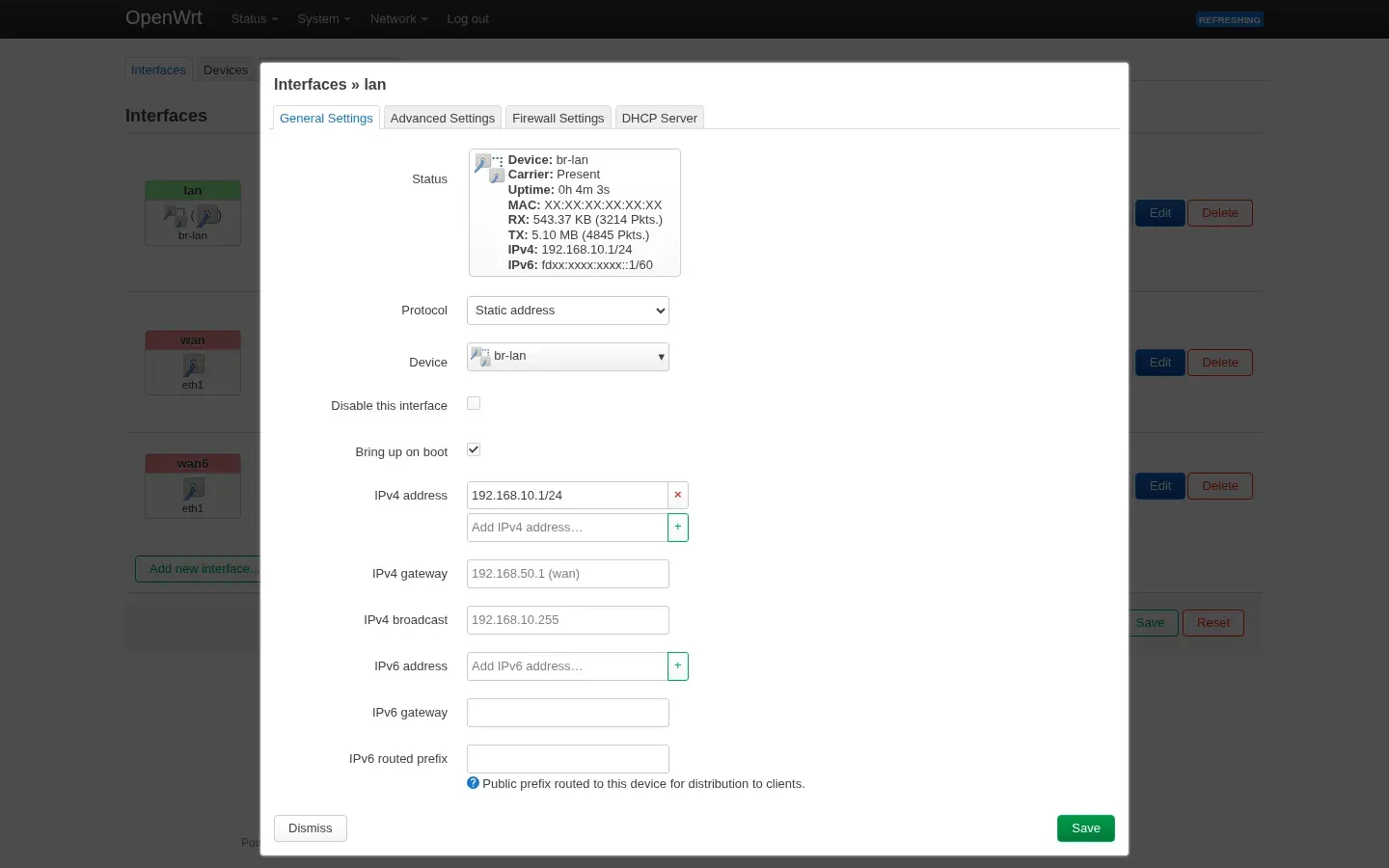
ExpectedLAN uses the new subnet and the DHCP range follows.
uci set network.lan.ipaddr='192.168.10.1/24'uci commit network
uci set dhcp.lan.start='100'uci set dhcp.lan.limit='100'uci set dhcp.lan.leasetime='12h'uci commit dhcp
/etc/init.d/network reload/etc/init.d/dnsmasq restart
network reload immediately drops the old SSH/web session; that is expected. The command may end with a timeout/disconnect, which does not mean it failed.
On the first run, network reload + dnsmasq restart alone did not give the DHCP client a lease; after rebooting OpenWrt the same client got 192.168.10.191/24. If DHCP does not lease, schedule a reboot instead of only restarting dnsmasq repeatedly.
Expecteduci has the new subnet for network.lan and dhcp.lan.
Get back in
Section titled “Get back in”- Give the management machine a temporary static
192.168.10.2/24, gateway192.168.10.1; - or release/renew DHCP so the client gets
192.168.10.x; - open
http://192.168.10.1/; - the old
192.168.1.1should time out instead of opening the old page.
curl -I http://192.168.10.1/If the old address still opens, check browser cache, a stale tab, another device holding the old IP, or whether you changed the current LAN.
ExpectedThe new address opens LuCI/SSH; the old address stops responding.
Verify
Section titled “Verify”ip -4 addr show br-lanuci show network.lanuci show dhcp.lanubus call network.interface.lan status | head -20grep -R "dhcp-range" /var/etc/dnsmasq.conf* /tmp/etc/dnsmasq.conf* 2>/dev/nulldhcp-range should contain 192.168.10.100,192.168.10.199 and /24.
Expectedbr-lan uses the new address and dhcp-range uses the new subnet.
ip addr showip routecat /etc/resolv.confping 192.168.10.1Release the old lease/reconnect. If the client still gets 192.168.1.x, check the DHCP range, a second DHCP server, and whether the client is still on the old segment.
This E2 run tested DHCP in two stages: with only
network reload+dnsmasq restart, the netns client got no lease; afterreboot, the same netns client got192.168.10.191/24and gateway192.168.10.1. The page therefore treats “reboot, then retest DHCP” as a required step rather than assuming reload is enough.
ExpectedThe client gets 192.168.10.x and gateway/DNS 192.168.10.1.
ip -4 addr show eth1ping -c 3 192.168.50.1nslookup openwrt.org 192.168.10.1Changing only LAN should not reset WAN DHCP/PPPoE. If you changed WAN too, verify it separately.
ExpectedWAN still works; changing LAN did not reset it.
Rollback
Section titled “Rollback”uci set network.lan.ipaddr='192.168.1.1/24'uci commit network/etc/init.d/network reload/etc/init.d/dnsmasq restartThe management session drops again; move the client back to 192.168.1.x or DHCP and confirm the old address.
ExpectedThe old address works again and the new one times out.
- Log in via serial/HDMI/PVE console;
- check
uci show network.lanandip -4 addr show br-lan; - change back to the old address or a subnet you can reach;
- if the config is a mess, restore
/etc/config/network.bak.*and/etc/config/dhcp.bak.*; - factory reset is the last resort and erases configuration.
ExpectedRecover without a factory reset.
Common failures
Section titled “Common failures”The old address still opens
Section titled “The old address still opens”Browser cache, a stale tab, another device holding the old IP, or the client is still on the old segment. Use a private window/new terminal and confirm curl hits the new IP.
The new address does not open
Section titled “The new address does not open”- The client is not in
192.168.10.0/24; - wrong static address/gateway;
- stale ARP:
ip neigh flush dev <iface>; - the firewall blocks LAN management;
- you changed WAN or another interface.
DHCP does not work
Section titled “DHCP does not work”dhcp.lan.start/limitis outside the new subnet;dnsmasqwas not restarted, or/var/etc/dnsmasq.conf*still has the old range;- reload alone still gives no lease: reboot OpenWrt and retest (it worked in this lab);
- a second DHCP server (another router/VM) exists;
- the client did not release the old lease;
- check
logread | grep dnsmasqforno address range/interface errors.
The new subnet conflicts
Section titled “The new subnet conflicts”Overlap with the upstream ONT, VPN, or another LAN/VLAN causes routing/resolution problems. Choose another subnet; do not force it.
E2 lab run (2026-10-20)
Section titled “E2 lab run (2026-10-20)”- Environment: PVE 9.2.2; OpenWrt 25.12.6 x86 VM 200; LAN
192.168.1.1/24→192.168.10.1/24; DHCP100–199. - After change: old
192.168.1.1100% loss; new192.168.10.1ping/HTTP 200; LuCI/SSH worked. - Rollback: old address HTTP 200; new address timed out.
- DHCP: reload alone gave no lease; after reboot the netns client obtained
192.168.10.191/24and gateway192.168.10.1. - Not verified: physical clients, IPv6, upstream-conflict scenarios.
- Screenshot:
src/assets/screenshots/luci/lan-edit-192-168-10.webp(MAC/IPv6 redacted).
Sources and review
Section titled “Sources and review”- This is E2: address switch, old-address failure, DHCP lease after reboot and rollback were tested; physical clients, IPv6 and upstream conflicts were not.
- Recipe:
tests/recipes/lan-address-change-25.12.md. - No independent reviewer; conclusions are limited to this VM environment.
Sources
Independent OpenWrt notes. Every page states the firmware, device, package manager and way back.
Icons: Solar by 480 Design, CC BY 4.0